October 21, 2026
5 Tips To Improve Your HVAC Site
HVAC businesses could do everything right: aggressive marketing, targeted SEO, automate tasks with AI for increased efficiency, adopt advanced lead generation strategies, and so on.
Key Takeaways:
- Visitors tend to skip businesses with no new reviews within the last 3 months
- Even the best HVAC websites have a lot of room for improvement
- HVAC website should have different pages for different services for better Google ranking
- Websites need to be optimized for mobile users
HVAC businesses could do everything right: aggressive marketing, targeted SEO, automate tasks with AI for increased efficiency, adopt advanced lead generation strategies, and so on.
Nothing matters so long as the website performs poorly, impacting traffic and causing lead loss.
What Are the Best Tips for a Better HVAC Website?
The following 5 tips are designed to achieve two things: improve your HVAC website design and increase visitor satisfaction. When taken together, these two fixes are fundamental for your HVAC marketing campaign.
Tip 1: Improve Speed and Adapt it to Mobile
When it comes to website navigation, speed is key. The visitor won’t even get to scroll through your services or check our HVAC labor rate calculator or the rest of the tools if the website’s loading speed tests their patience.
When it comes to the first impression, two areas matter the most:
Website speed:
- Test your site with Google PageSpeed Insights, which gives you a mobile and desktop loading speed and even recommends fixes based on the findings.
- Compress and resize images – this alone will improve your website’s performance visibly.
- Updating your hosting is sometimes the best solution, especially if your current free plan is underperforming.
- Check the website for unused plugins and heavy scripts and remove them to free up memory.
Mobile-Friendliness:
- Make buttons like “Schedule Service”, “Contact Us”, or “Call Now” thumb-friendly and visible on mobile without having to zoom.
- Make the text readable, with a big, clear font and without side-scrolling or annoying pop-ups ruining the reading experience.
- Keep the contact forms short – nobody likes to fill up excessively long forms on their mobiles. A name, along with the phone and address should do.
- Have a click-to-call button on every page, without making it too intrusive, such that the visitor can tap it any time he wants.
These fixes alone should improve your website’s performance enough to see your lead generation improve.
Tip 2: Highlight Your Booking and CTA
Visitors should know the second they arrive on your website how to contact you and where to click. Your CTAs should be everywhere they fit naturally, without being too intrusive or spammy-looking: in the header, at the end of your service pages, and at the top of the homepage.
The same should go for your phone number. Also, make sure you’re using descriptive wording for your CTAs. Use “Schedule Service” and “Get a Free Estimate”, instead of the more vague “Find Out More”.
Do the same for your booking buttons or forms and make sure you have several ways by which visitors can complete the booking process. A 24/7 hotline (if you do offer that) is one way, but not the only way. You should also have online booking and text-to-book options for those who can’t call.
Tip 3: Have Separate Service Pages
A single “HVAC Services” page can’t possibly cover the entire service range you offer. Visitors should be able to easily find the service they’re looking for. This implies having different pages for different services, like “AC Repair”, “AC Installation”, “Heat Pump Installation/Repair”, “HVAC Maintenance Plans”, etc.
Dividing your services by areas (if it applies) also makes it easier for visitors to find you in their neighborhood or city. Make every city page unique with personalized text to prevent Google from flagging them as low-quality “doorway” pages.
The same advice applies to your service pages, like your general HVAC pricebook, emergency services, and repair jobs – the content should be unique, fit the topic, and offer valuable information to readers. Anything less and Google may refuse to rank you.
[CTA_INSERT]
Tip 4: Show Proof That You're Trustworthy
Your goal should be to build legitimacy and trustworthiness and several elements contribute to that, like:
A real review section with the respective Google star rating system
- Recent customer reviews – visitors tend to skip businesses with no new reviews within the last 3 months
- Certifications and the Better Business Bureau (BBB) rating (Homepage and About page)
- License and insurance details (footer and About page)
- Team, truck, and job-related photos (hero section, About page, service pages)
- Guarantees and warranties (service pages and near the booking buttons)
- Experience and awards (where applicable) listed on your Homepage and About page
Also, your website should use HTTPS for a plus of security. Otherwise, visitors will get the “Not Secure” message, which means they’ll either not visit the website or not book your services, because that implies them giving you their personal data.
Tip 5: FAQ and Ranking for AI
An extensive FAQ section is great for your HVAC SEO campaign. You should have both a dedicated FAQ page and FAQ sections under each service page, with questions that are popular among clients, like “Should I replace or repair my 10-year-old AC?”.
Be succinct with the answers, because Google prioritizes the content that answers the clients’ questions fast and directly.
Also, consider writing guides based on these types of questions as well. Blog pieces like “Should You Repair or Replace Your AC?” can rank your website faster and even increase your chances of being cited by AI.
What Are the Best HVAC Websites?
The following are some of the best HVAC websites in terms of website optimization:
What they do right:
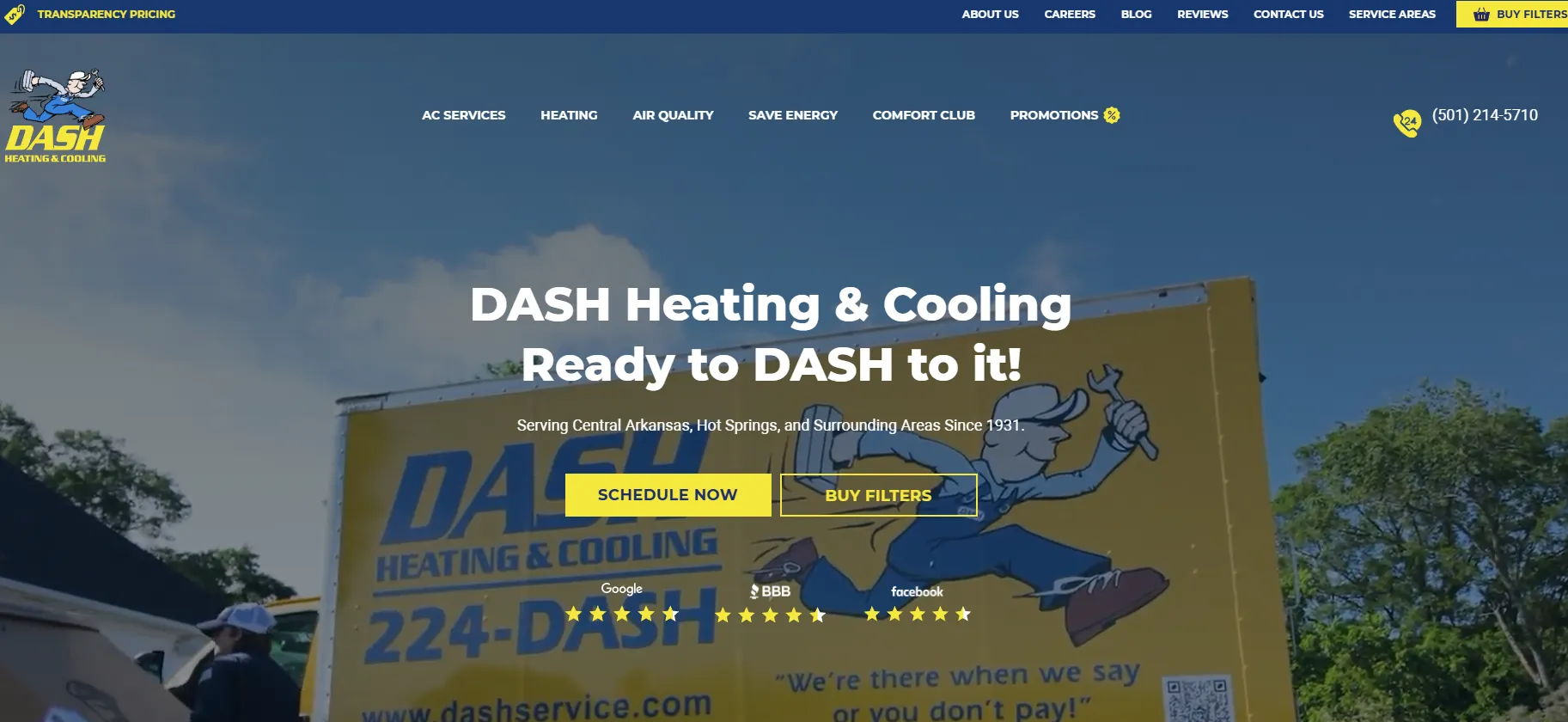
- “Schedule Now” button present on the homepage, along with the Live Chat and the 24/7 phone line.
- The “True Transparency Pricing” section on the homepage which lists actual prices for minor and major interventions.
- The “Dash Comfort Club” membership offer that explains the benefits in clear terms.
- Customer review sections divided between BBB, Facebook, and Google on the homepage with live links.
What they do wrong:
- No FAQ page or section anywhere, which is a missed opportunity to rank for AI searches and offer value to potential leads.
- The customer review notes on the homepage lack details like review count and dates, forcing visitors to leave the website to get the whole picture.
- No license number and no certifications on the homepage, which would’ve sent strong trust signals.
What they do right:
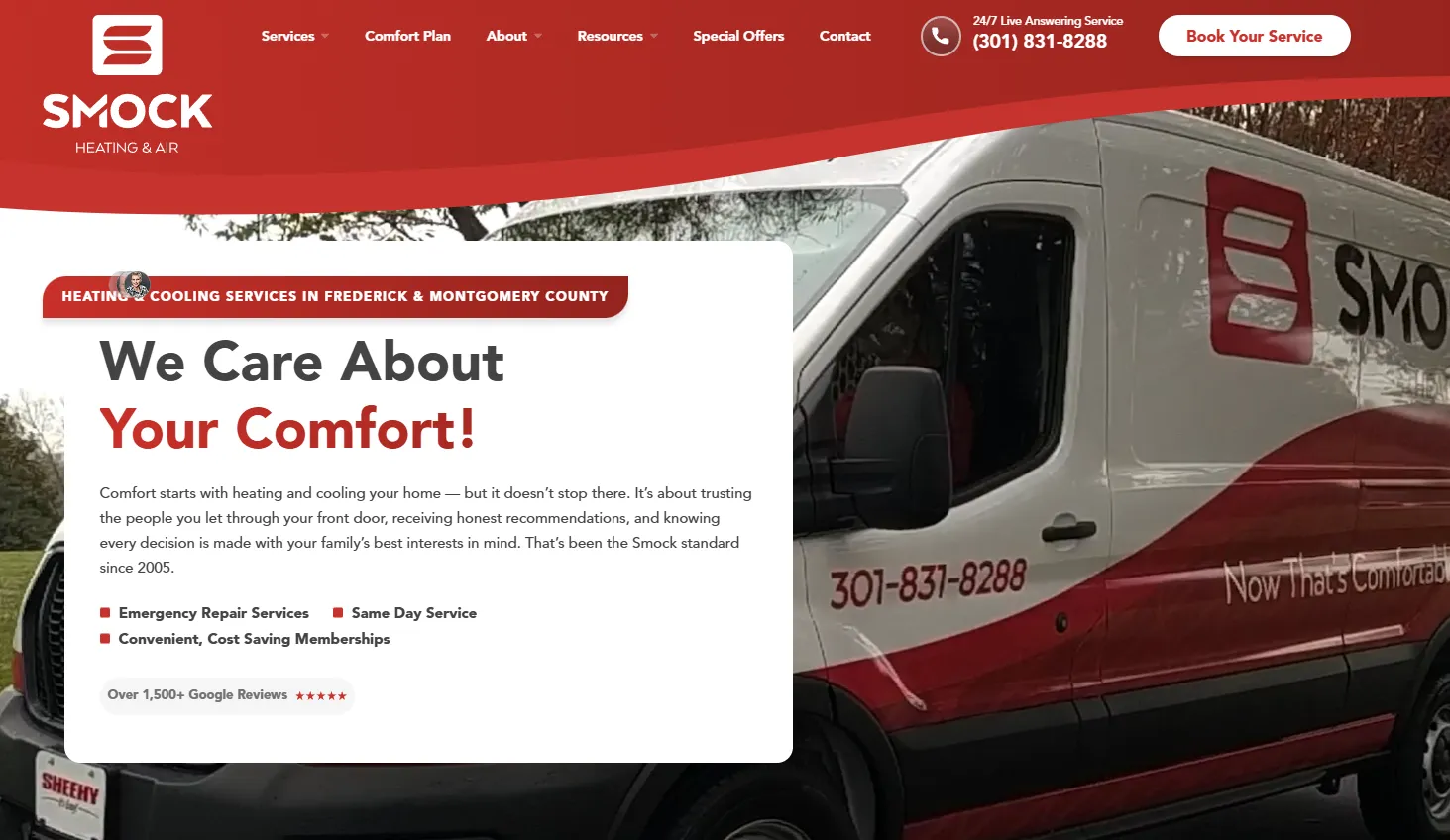
- Great website structure, with separate pages for different services (HVAC repairs, maintenance, indoor air quality, heat pump and furnace, etc.)
- 13 dedicated city pages for areas across Frederick and Montgomery County.
- Great trust signals thanks to the detailed review section, information about service warranty, team page, and the full license number.
- The FAQ section right on the homepage and an instant online HVAC quote.
What they do wrong:
- A long contact form asking for information like name, email, phone, and zip code, making it difficult for mobile users to check everything.
- The reviews listed on the homepage are 10-months old, which is a problem given that many customers skip businesses with reviews older than 3 months.
What they do right:
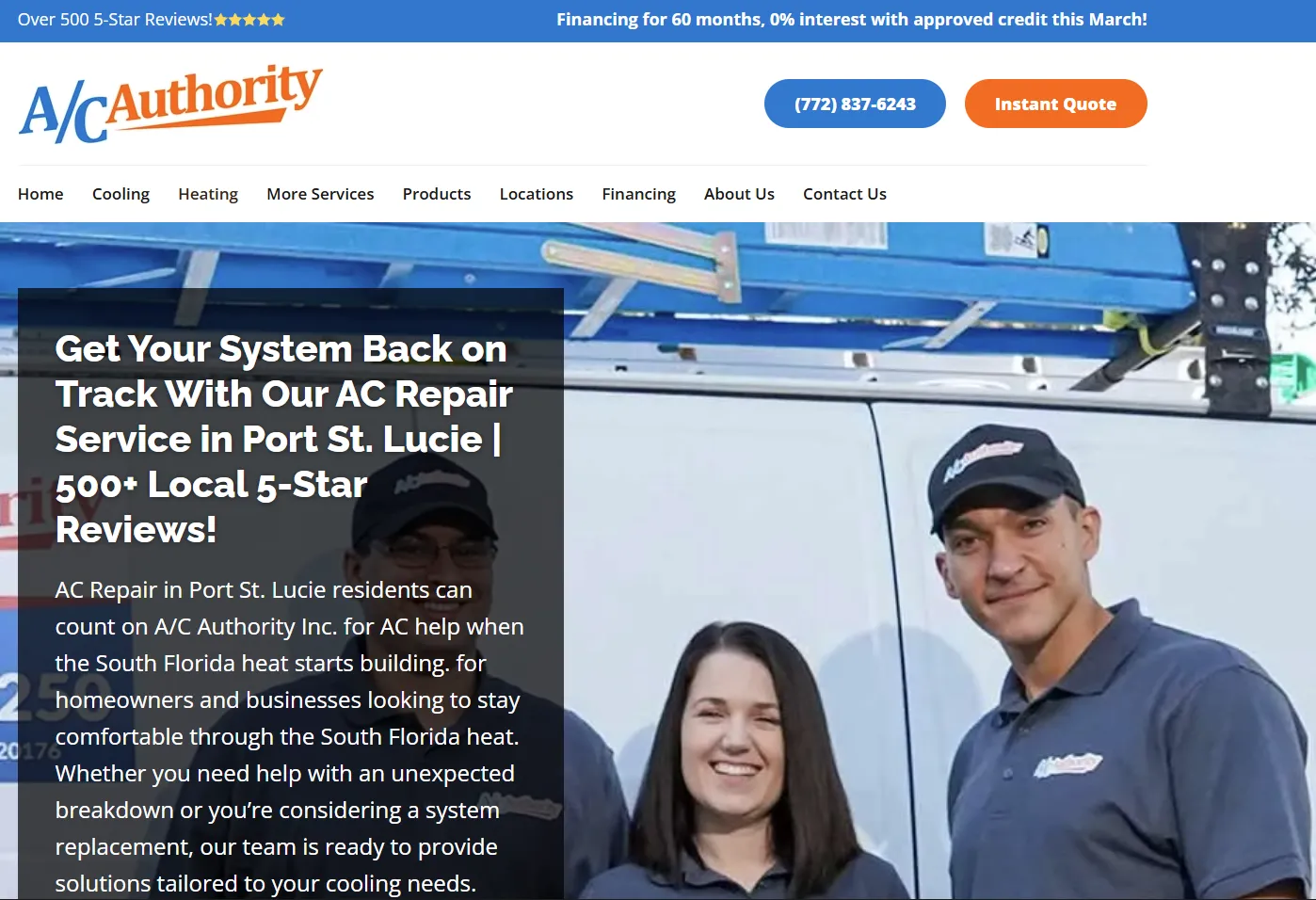
- Main lead conversion channels listed at the top of the homepage (phone, online booking, instant quote).
- Separate pages for services like AC repair, ductwork, thermostat installation, and air purification.
- Great trust signals thanks to BBB A+ accreditation, the 10-year warranty for parts and labor, the FAQ page, and the dedicated blog.
What they do wrong:
- The 60-month financing promotion is outdated, dating back to March
- The intro copy is sloppy, containing forced keyword placements and grammatical errors, hurting the team’s professional image.
- The homepage copy invites visitors to “reach out online or call anytime you need urgent help”, which contradicts their working our plan (Monday-Friday – 8:00 AM - 4:00 PM)
What they do right:
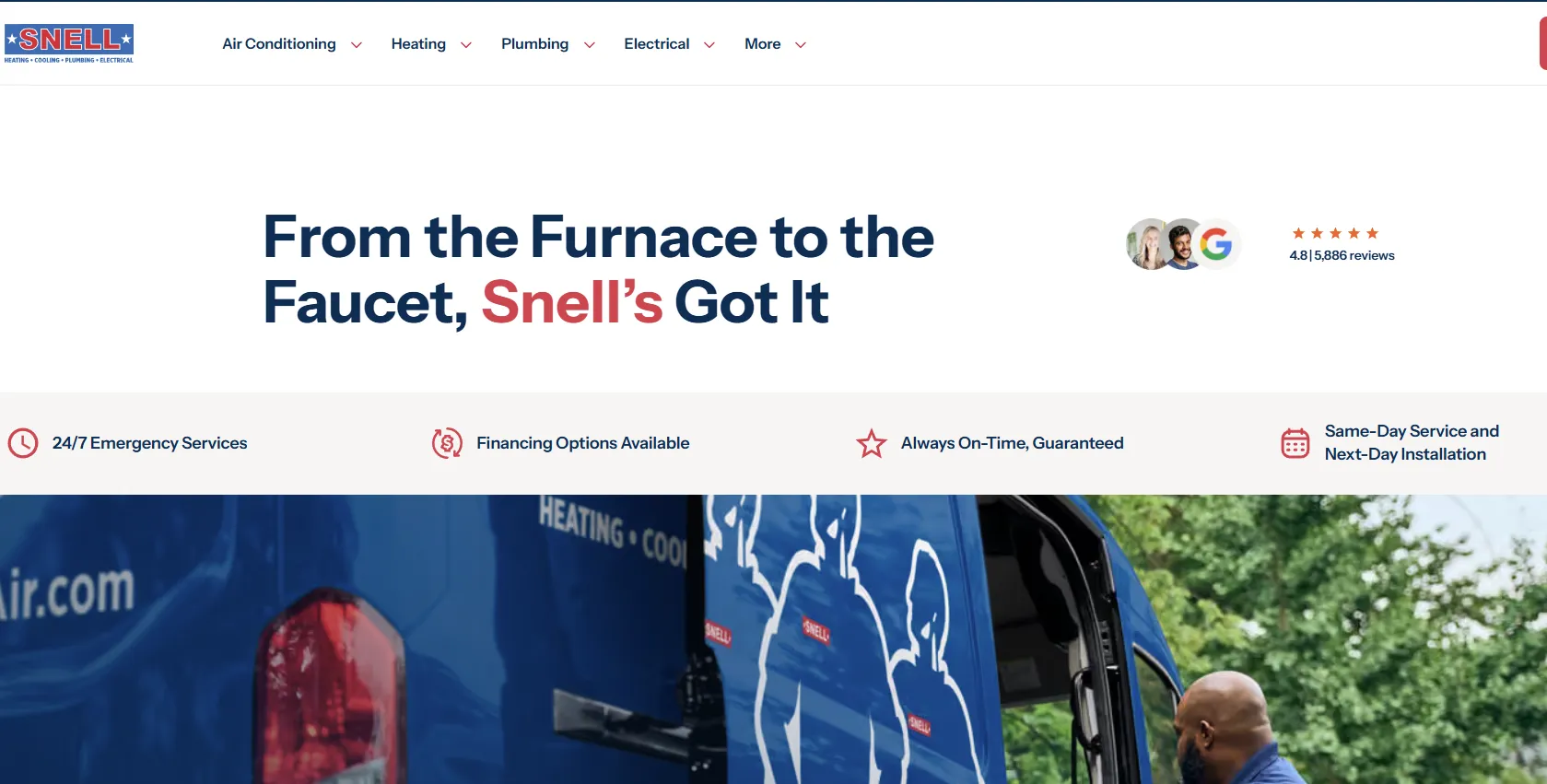
- Financing information on the acquisition of a new AC system on the homepage.
- Clear service promises listed on the homepage (24/7 emergency response, financing options available, always on-time guaranteed, same-day services and next-day installation).
- Separate and detailed service pages for AC, plumbing, heating, and electrical.
- License number visible, along with a ZIP code for easy service check-up by area.
What they do wrong:
- No FAQ section – there’s the Learning Hub, but that’s a blog-style section.
- The financing option at the top of the homepage opens up a disclaimer section which may be difficult to read on mobile.
What they do right:
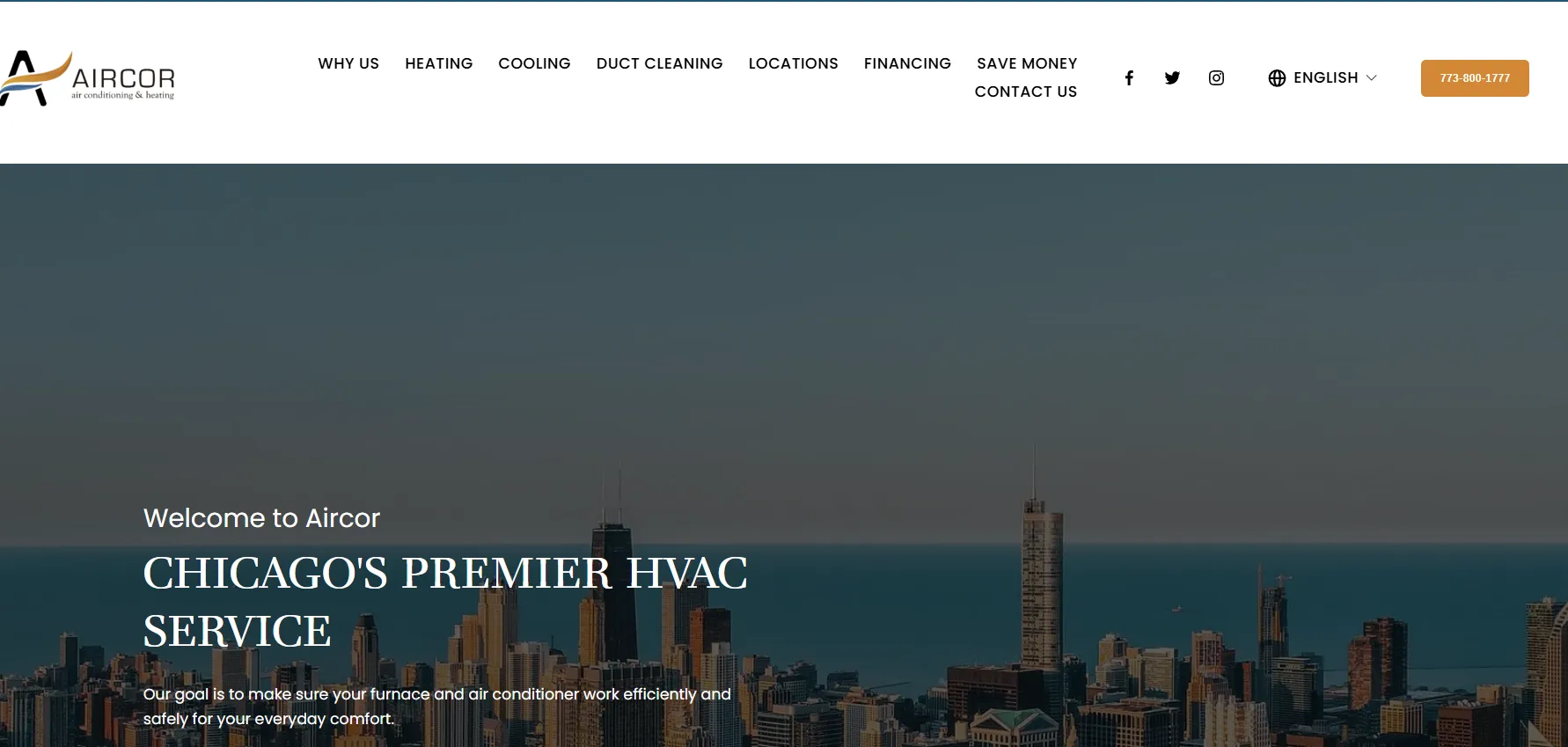
- Separate pages for services like heating, cooling, and duct cleaning.
- The Locations and Financing sections present right on the homepage.
- Great trust signals thanks to the BBB seal, 24/7 emergency service coverage, and the 100% guarantee on the entire service range.
- The phone number visible at the top of the homepage.
What they do wrong:
- The reviews displayed on the homepage are 3-5-months old and up.
- The image-based buttons for Duct Cleaning, Locations, Financing, and Contact Us, which makes them less descriptive and harder for search engines to read them.
- No FAQ page visible in the homepage menu.
What they do right:
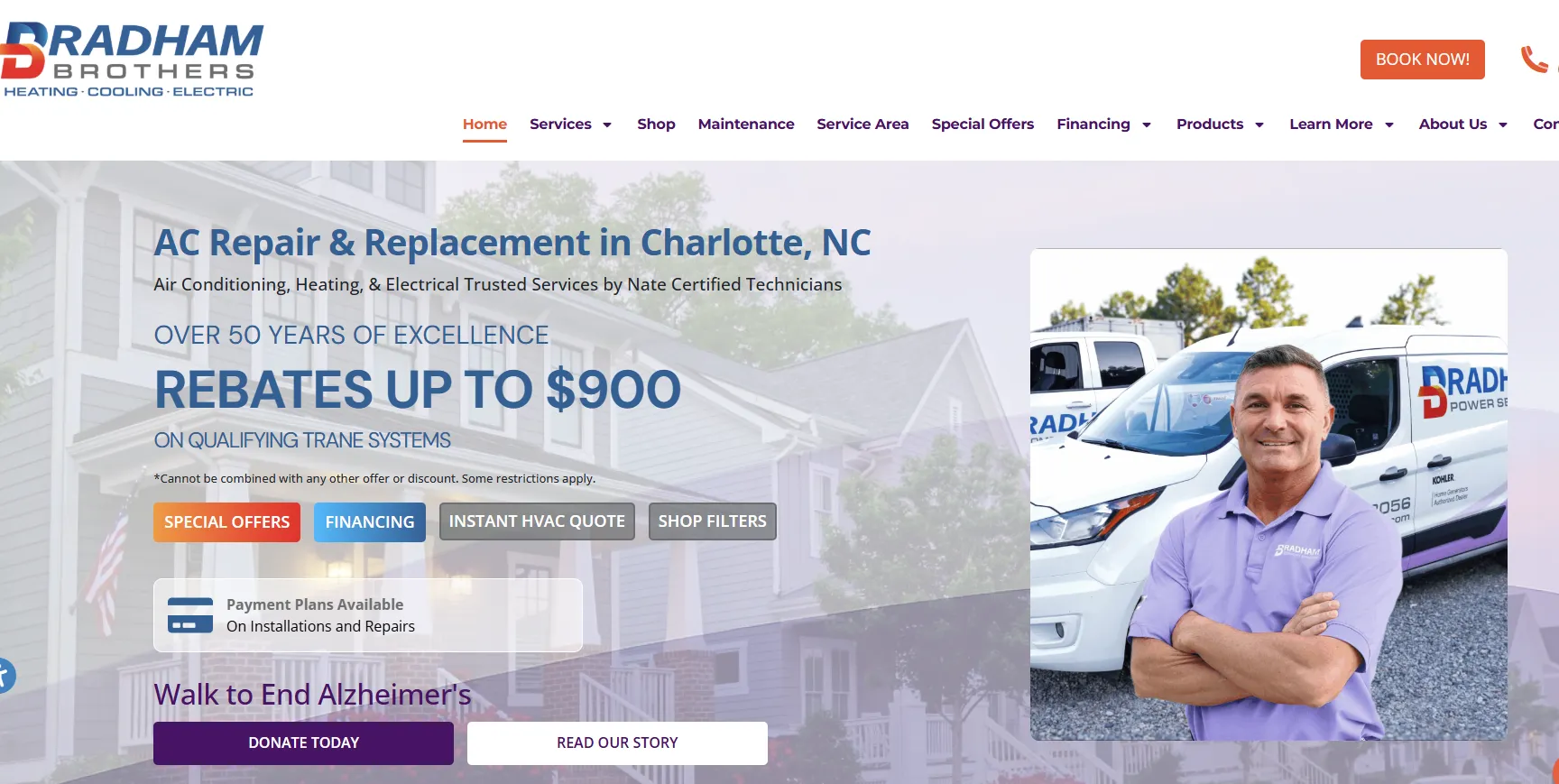
- Separate service pages for services like HVAC, indoor air quality, generators, and heating.
- Great promotional sections on the homepage (About Us with the gallery and testimonials, team photos, the Why Choose Us-type section)
- Interactive buttons for lead generation sections like Special Offers, Financing, Instant HVAC Quote, and Shop Filters.
- FAQ section on the homepage.
What they do wrong:
- The flippable banners for HVAC repairs and HVAC maintenance contain duplicate text, while the HVAC installation banner repeats the intro text, which can cause Google to treat it as low-quality content.
- The cluttered first screen, containing a charity section with 2 buttons, the Payment Plan section, Financing, etc. These all compete for attention and dilute the main call to action.
What they do right:
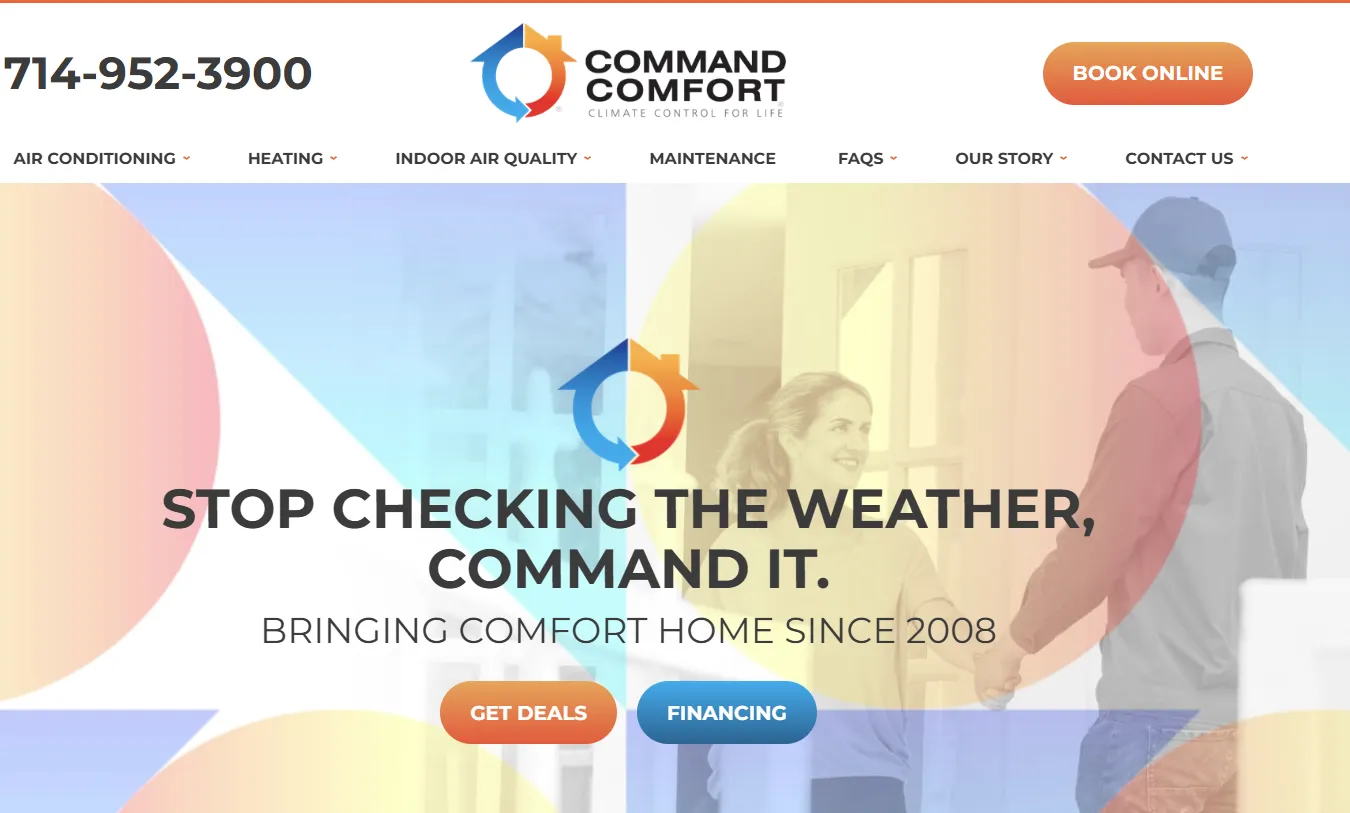
- The memorable slogan stealing the thunder on the homepage (“Stop Checking the Weather, Command It.”)
- The strong trust signals with the California license number, the limited-time warranty, and technician background checks.
- Separate pages for services.
- Contact details visible on the homepage (phone number and the Book Online button).
What they do wrong:
- The FAQ section in the main menu leads to a blog-style article instead of an actual FAQ section.
- The View Customer Reviews section doesn’t lead to the Google Reviews page, but instead lists 5 customer reviews with no indication of the total review number.
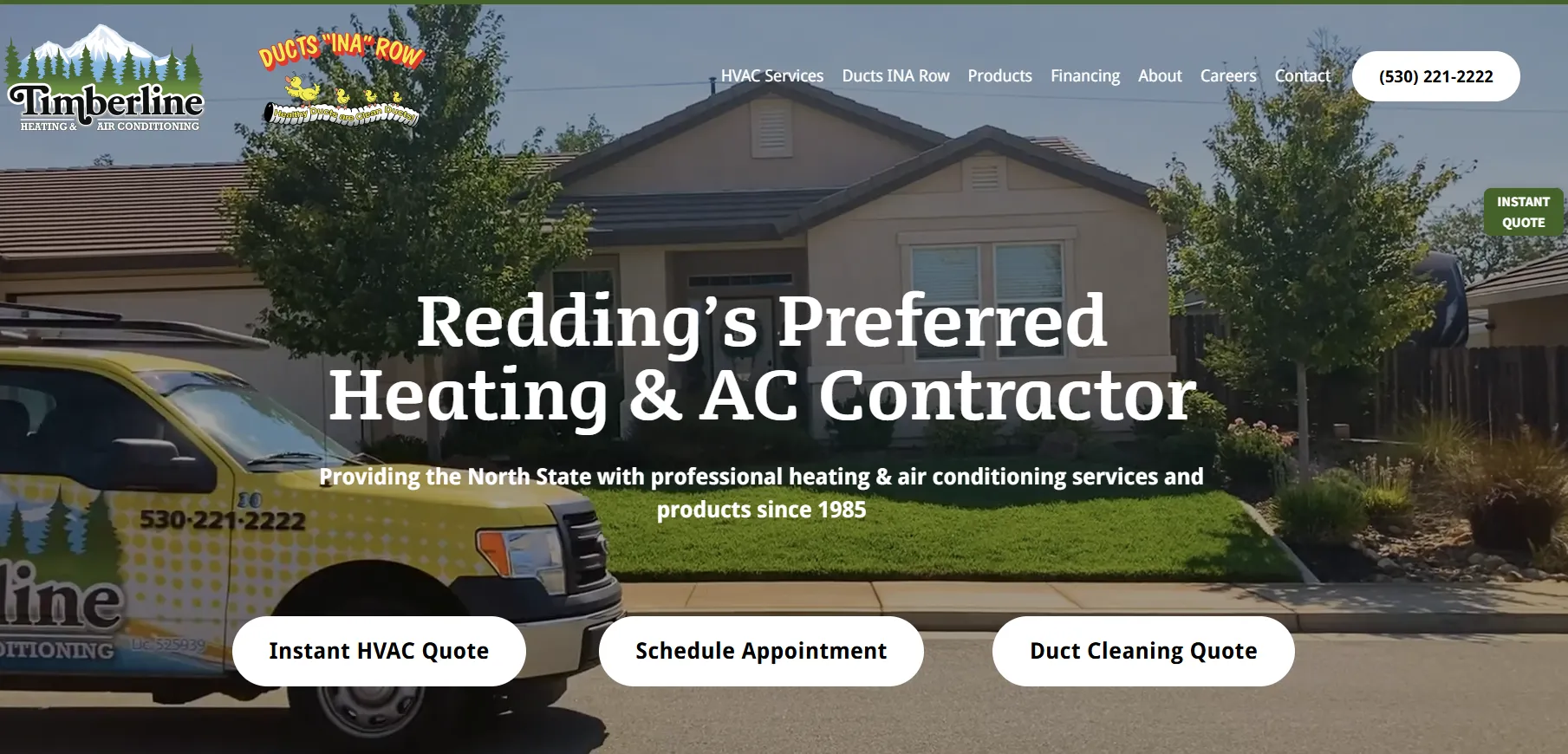
What they do right:
- The clear and persuasive local headline stating the business’s specialty and time in the trade.
- The Residential and Commercial HVAC Services section, listing the different services and featuring real photos of vans, the team, and some of their products.
- The Instant Quote button on the side.
- The Ducts “INA” Row slogan with the memorable image attached.
What they do wrong:
- The review section is at the bottom of the homepage and the most recent review is from December 2025.
- The Schedule Appointment button leads to a Contact Us form instead of an online booking-type section.
As you can see, even the best HVAC websites have room for improvement. You can use them as inspiration, along with our today’s tip list, on what to do and what to avoid when it comes to website optimization.
How to Audit Your HVAC Website in 30 Minutes
Now that you’ve implemented these hvac website design tips, you need to make sure they’re working as intended. Here’s how you can verify that:
As a general rule, you should always fix the things that stop people from contacting you (hidden or wrong phone numbers, failed booking process, broken forms, etc.) and only then address speed, overall usability, content, and search visibility.
Once everything is in place and working as intended, all you’re left with is tracking your KPIs, like lead conversion and website traffic, to see whether there are any improvements.
FAQ
What should an HVAC website include?
Your HVAC website should contain everything of interest for the client, including your contact details, the available services, blog content for SEO growth, and a review section at a minimum.
How fast should an HVAC website load?
Aim for a loading speed of 1-2 seconds at most. Anything above that will increase the number of visitors leaving the website by as much 32%.
Do I need an online booking form for my HVAC website?
An online booking form is not mandatory, but it’s helpful to those who can’t call for one reason or another. Most customers prefer to use the phone in case of emergencies, but many opt for online forms and emails for contact.
How often should I update my HVAC website?
Update your website only when necessary, like when adding or changing services, when the new season begins, or in case of promotions and discounts. Other than that, a full website redesign is only necessary if your website no longer performs well for mobile or you have a more extensive service change.
Should I hire a professional to build my HVAC website or can I do it myself?
Small businesses and independent contractors prefer to build their websites themselves for budgetary reasons. Website builders like Wordpress or Wix are great for that.
However, as the business grows, you want to have a professional in charge to handle the design, local SEO, speed and overall performance, etc.
How do I get Google to list my HVAC website?
First, you need to complete your Google Business Profile to set up your business’s contact details (name, phone number, address). Then there’s everything else, including creating content, setting up your SEO campaign, having an active review section, and obtaining valuable backlinks for a plus of authority.
Google will eventually pick up your website, so long as you maintain the quality and consistency.
How can I tell if my HVAC website is working?
To check if your website is working, keep track of KPIs like calls, booking rate, and website traffic, to see whether there are any improvements.
Build the tools your trade needs.
Dalton Mills gives people in the trades the opportunity to create custom workflows and software tools without any prior technical experience.
Apply For Early AccessRead next

Marketing for Electricians – Complete Guide for 2026
According to the Bureau of Labor Statistics (BLS), the electrical trade will see a 9% job growth by 2035, faster than the average recorded across all jobs.
October 22, 2026

The 5 Lead Generation Strategies Plumbers Need to Know in 2026
Recent studies suggest that the majority of US homeowners look for local businesses online at least once a week and around a third of them do it daily.
October 19, 2026
.webp)
Plumbing Company Names: 100+ Ideas for 2026
The number of plumbing businesses in the US is between 129,000 and 132,000 according to industry data, up 1.2% from 2025 and growing at an average rate of 1.7% since 2021.
October 16, 2026